Showing posts with label server. Show all posts

Friday, January 10, 2014

Server 2012 Activation Error 0x8007007B


I recently noticed that I had one server that refused to activate.  There were several of these begging for activation before I got Key Management Server (KMS) up and running and I thought they had all activated. Apparently, I overlooked one.  I logged into a rarely used box and there it was, requesting activation.  Ok, simple enough, I didn't know why it hadn't activated on it's on, but that was ok, I'd click the box to activate it.  Not so fast, I clicked the box, waited for it to finish and then I got hit with a "0x8007007B Windows couldn't be activated" error message like this one.
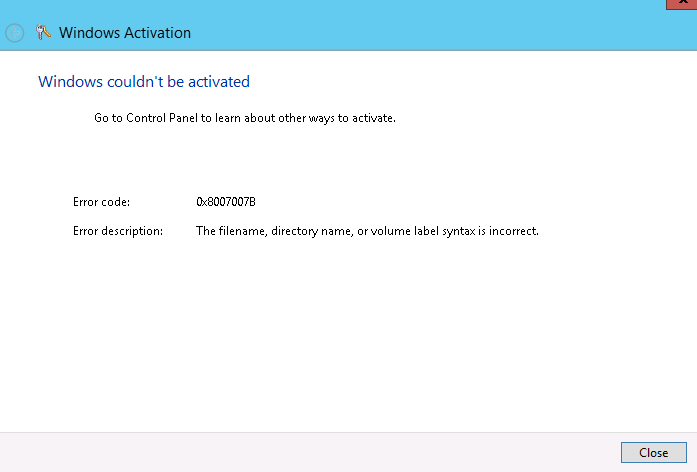

How friendly, at least it had an error code.  So I started my search of what causes this error.  I investigated some of the causes others had posted and didn't have any luck.  Then I found this Microsoft knowledge base article.  Method #3 is what pointed me in the right direction.  I tried the mention command

nslookup -type=all _vlmcs._tcp>kms.txt

and got this "Non-existent domain" error message.

Non-existent domain

I don't think that's supposed to happen.  I try this command on another server and it generates a nice pretty txt file similar to what's shown in the kb article.  This means we've uncovered another sympton.  Time to do some more digging and to figure out what can cause this error.

It turns out what was happening is that the DNS suffix (the part after the host name) wasn't getting added correctly to DNS queries.  What this means is when it tries to lookup these records that it is failing because it doesn't know the domain name, hence the "Non-existent domain".

Here's an article that I found about DNS suffixes.  It mentions this handy powershell command to check your settings.
Get-DnsClientGlobalSetting
Here's what my settings looked like.

Get-DnsClientGlobalSetting

This might be part of my problem.  Off to the network adapter configuration we go.  I check the DNS settings and the DNS suffix for the connection appears to be correct.  For whatever reason the server is just refusing to use it.   Luckily, there's a handy "Append these DNS suffixes" section right above that. I added the correct DNS suffix right there. It now looks similar to this screen.

DNS Settings

After click OK half a dozen times I was ready to try to activate Windows again. Success.... It worked that time.


Friday, December 13, 2013

DFS Replication and the SYSVOL Problems

I recently noticed on one of my domain controllers that there were some warnings in the Event Log for DFS Replication.  Well, actually what I noticed was that the SYSVOL folder on some of my DCs didn't have all of the GPO folders.  A bit of searching to find out what causes that led me to looking into the Distributed File Services Replications.  Which in turn led me to the event viewer.  Which led me to the Warning ID 2213 from DFSR.

Warning 2213
The warning


Yay! I love warnings in the event viewer.  Wait, this is just a warning, "Hey, by the way I'm not replicating your crap any more and I'm not going to replicate it any more until you manually intervene."  Isn't that nice?  This looks like something that should be more than just a "warning."

The warning looks a bit scary, but it is very helpful in that it tells you exactly how to fix it.  Have to give Microsoft points for that one, put the fix right there in the warning.  I mean, you can copy and paste the command out of the warning message and into a command prompt and it'll fix itself.

Now, why exactly did I have to wade through the event viewer to find this warning and this command?  Where's Clippy when you need him?  A nice "Hey I noticed you didn't do a clean shutdown, would you like to re-enable your SYSVOL replication, it might be important?"  Why did they neglect that?  When I log back in it asks me why it was shut down improperly, why not take that same opportunity to ask about re-enabling the replication too?

But, I digress, back to fixing replication.  What you ask?  I'm not done yet?  I told you to cut and paste the command from the event description to fix it didn't I?

If you're like me, it didn't work.  I selected the text, I copied the text, I click on the Powershell prompt, waited it for it to open, I pasted the command and finally pressed enter.  Only to be greeted with an "Unexpected switch at this level" message.  Well that was nice and friendly.  I bet I need an elevated prompt.  So this time I right-clicked on the Powershell prompt and selected "Run as Administrator."  Surely that will fix it, nope, it doesn't, it gives you the same error message.  Ok, so I must have just not selected everything before I copied.  I tried it a few more times, nothing, same error message.

Now it's time to hit the internet.  I do some searching and I find this post over on howdoicomputer.com.  It looks like they ran into the same problem.  The trick is to use a regular command prompt, not a Powershell prompt.  How do you like that?  The answer's right in the event message, "from an elevated command prompt."  So Microsoft's be all end all Powershell prompt is useless when it comes to using this WMI command.

I also ran into the DFSR error 4012 that they mention in that same post over at howdoicomputer.com.

Error 4012
The error

By default, you've only got 60 days to correct the problem, after that it will not restart replication.  The quick fix for that is to change that default window to something greater than however many days you have been out of replication and then run the command again.  The command for increasing that default is:

wmic.exe /namespace:\\root\microsoftdfs path DfsrMachineConfig set MaxOfflineTimeInDays=200

That 200 on the end is the number of days to increase it to (you can pick anything above how many days you're out)..  I'm a bit embarrassed to admit, that I had run substantially longer than the 60 day default (you can see in the screenshot) and had to increase it a lot to get it to run.  However, when I finished I did set it back its default of 60 days.

When it's all said and done you should get a Information event from ID 2214 that says the replication service successfully recovered.
Information 2214
It's fixed!